List of things I tend to forget how to do....

  • Configuring DNS + SRV records for SIP.
  • Using tcpdump (command line).
  • Using sox to convert wav to gsm.
I guess I have to put a quick note for oft-used commands somewhere..., here.

Right now I'm trying to get AG-Project's CDRTool working on a Debian. It works together with OpenSIPS. I will use it as a testbed for charging alternatives we're trying to come up with for our solution offering. We're heading toward Diameter-based solution (since Diameter is the thing recommended for IMS). However, we're still in search for an opensource / free diameter server component (specifically CDF), and we haven't found one. So, we'll use this CDRTool (together with OpenSIPS and it's Radius accounting module) as a temporary solution. Let's see if it works.

Now, first I need to get this OpenSIPs taking registration for a domain (e.g.: mytelco.net). For that I need to create SRV records, somewhere in the BIND configuration. Done that before, but already forgot how. Geez :). I hope this one would work: http://www.anders.com/cms/263 ... or this... http://sipx-wiki.calivia.com/index.php/DNS_Configuration

UPDATE: Ok, done. At least now my OpenSIPS handles registrations & requests for domain "mytelco.net". I put here screenshots and quick notes. They summarize a couple of things I learned from various resources on the web during the setup (useful for future reference).

(1) Get OpenSIPS installed. For basic usage (as simple forwarding proxy) it is pretty straightforward, just follow the instructions on this page: http://bit.ly/cgFNxy. I used version OpenSIPS 1.6.1 on Debian 5, by the way. Please note, there's a little error in that manual: the author mistyped the db password for user 'opensips'. The two GRANT lines at the end, they should've been like this:
GRANT ALL PRIVILEGES ON *.* TO opensips@localhost IDENTIFIED BY 'opensipsrw';
GRANT ALL PRIVILEGES ON *.* TO opensips@127.0.0.1 IDENTIFIED BY 'opensipsrw';
(2) Install BIND9: apt-get install bind9
(3) Configure BIND9: create zone files (forward and reverse), register them (in named.conf.local), reload bind (/etc/init.d/bind9 reload). See picture:


Right after that, modify resolv.conf (so that your Debian use the local DNS you just configured), and verify. See picture:


One obvious caveat here: if you use use dynamic IP (as in my case), you will have to repeat doing those steps (in the two pictures above) everytime you restart your machine (change the IP in the bind conf, and re-edit the resolv.conf).

Link to pages I read for configuring this thing:
(3) Modify OpenSIPS config files: (1) /usr/local/etc/opensips/opensipsctlrc, and (2) /usr/local/etc/opensips/opensips.cfg. In the first file, modify the value of the property named SIP_DOMAIN to mytelco.net. In the second file, add this line:
alias=mytelco.net
That's it, and finally start your OpenSIPS: /etc/init.d/opensips start

The modification for file #2, I learned it from http://advantia.ca/references/opensips-1.5/INSTALL . Prior to doing that, I always got error 483 (too many hops) when trying to register from my SIP phone. I guess putting that alias is a quick fix (hey it works!), I yet have to see the surprises though (hope there's none!).

Finally, here's the configuration on the client side (X-Lite 3.0 on MS-Windows):


Now, on to the ugli(er) part: getting CDRTool working. I did that once as well, partially, also, forgot how to do it.... I will post the result once I get it done. Documentation was really scarce and inaccurate :|.

Alright, no I'm going to create a copy of my Debian's virtual harddisk. Chau!
UPDATE: This is so dissapointing. I thought after a year the situation of OpenSIPS & CDRTool has improved. Nope. Install guide of CDRTool is still inaccurate. Furthermore, although the latest release of CDRTool seems to be built in 2010, the install manual is still linked to FreeRadius 1.1.3!!! The latest version of Freeradius we have in Debian repository is: 2.0.x. Worse, CDRTool install guide doesn't mention that fact (you'll notice it only if you open the readme of the patch it provides for freeradius).

Gee.... Ok, I think I should forget CDRTool. All I need from OpenSIPS is just the usage data, raw CDR as generated by the OpenSIPS (which I will feed in to a better, more professionally-documented rating engine). So, goodbye CDRTool, adios, chau chau. I really doubt the authors if the authors of CDRTool spent some efforts to make sure it's usable for ordinary people like me.

Right now I'm reading the manual for enabling radius accounting in OpenSIPS: http://www.opensips.org/Resources/DocsTutRadius ... Alas! found some typos (filename, section 3.2., they should have typed radiusclient.conf instead of radiusclient-ng.conf). Also, in that same section, I'm kind of stuck trying to figure out what line to put in /etc/freeradius/clients.conf. Why, oh, why can't they reach the level of Asterisk (I'm referring to availability of QUALITY manuals / references).

Cataroo Presentation – Part 2 – Test cases

Here it is, part 2 of the presentation about Cataroo. In this part I explain a couple of points related to defining test-cases for the sample application (callback). While I’m at it, I also touch a couple of relevant points about the design of the sample application. I believe, to excel, a Software Development Engineer in Test (SDET), just like his SDE counterpart, has to have a firm knowledge of software design. Without further ado, I hope you enjoy this part!

That stylistic figurine in the video-still is wayang (shadow puppet, a form of art spread throughout Asia. It flourishes especially in Java and Bali).

Just came to know a couple of days ago (from youtube) a very cool group based in the US that innovates on wayang, ShadowLight Productions. Thirty years perfecting the techniques, onward. That is dedication. I invite you to check out one of their works, Ambrosia of Immortality.

The short clips I used in my video are Punjabi songs I like a lot (for the beat & also for the dancing):

Ok, back to tech topic :), just realized that this small series of presentations about Cataroo is actually what I had in mind for segment 2 of my IMS video-series.

Sharing: SIP-based call-recording application

I found this when I was digging my old archives last weekend:
It was a quick slides I made to highlights the design of a (prototype of) call-recording application we implemented in late 2008. As you can see in the slides, this application facilitates both manual and automatic recording of calls made with contact-center agents.

The recording itself is achieved by dragging the contact-center agent and the customer into a dynamically-created conference room, and have a silent-participant in the room, taping the conversation.

It is a sub-optimal solution. A better one would be to use things like mediaproxy or rtpproxy (have the RTP streams in the call go through that proxy, and tap the packets right there). The reason we designed it that way -- using conference -- is because they wanted to make use of the media server (with support for conferencing) that they have bought.

The source code is opened now; should serve as an additional resource for you who just started SIP-application development. I don't have time at this moment to write a how-to deploy and run it, less the detail of the design & code.

I invite you to do it. If you'd like to take that invitation, please write me an email at raka.angga@gmail.com or you can simply drop a comment here. Your help on this will be greatly appreciated, and it would really help fellow engineers out there.

Cataroo presentation -- part one.

Just uploaded the first part of the presentation of Cataroo.

I already have the screen-recordings of the manual executions of the test-cases. I need to edit them to present of a single, coherent story. I still have to think about a couple of points to say especially in the design of the test-cases section and data analysis section. I might be able to post the narration for the second (hopefully final) part tonight.

In the meantime, I hope you find this one useful!

Update: Just uploaded another video in this series, part 2 of cataroo presentation.

Cataroo


UPDATE: The video is available in another blog entry.
UPDATE: The user manual of Automated Scenario-Test Descriptor is available in another blog entry.

At this very moment I'm making a video presentation of a test-tool I just made. It is a cross-breed between that bastard thing, and a great test framework named KitCAT (Kit for Converged Application Test).

What's cataroo, you might ask. Well, here's the story. First, I named it BastardizedCAT (from Bastard + KitCAT). But then I found the name a bit ugly (it doesn't sound funny). A lookup in dictionary gave me this:
bastardized adj. (Arts): deriving from more than one source or style. impure (vs. pure) --- (combined with extraneous elements) [WordNet 1.5].
So, it's cross-breed, sort of. Coincidentally, when I was thinking of a better name, my cat was doing weird poses on my bed (please don't get me wrong). I was like: "Huh? Is that a kangaroo lying on my bed?". That's how the name cataroo came up (a cross-breed between cat and kangaroo).

Alright, here's the storyboard, with narration, of the presentation:
UPDATE: because I wouldn't be able to finish the video tonight, I decided to uploaded the scenario.xml (that contains the automation code) here. Look for it at the end of this posting. This is to give a sneak peek of what is to come....
(1) What's the purpose of this presentation.

In this presentation I'm going to show a way we can automate the testing of converged application. As in my other presentations, I will still be talking about telephony application, specifically the ones that use SIP as the signaling protocol.

(2) What's the story line of this presentation.

Before we get to the point of crafting the automation of our tests, we certainly have to start with an understanding of what we will be testing. Therefore I'm going to start with an explanation of the application I use as the vehicle in this presentation. You can take it as a quick-briefing about the requirement of the application.

Then, based on the understanding, we will move on to defining the test cases. We are not going to go in depth here with the techniques of designing system test-cases for this kind of application. So, we will just settle with a couple of basic / normal use-case scenarios.

Once we have the test-case defined, we, ourselves, will have to run it. This activity is useful, obivously, to validate the test-case. We might learn that we have missed a couple of steps, made several wrong assumptions, etc. Related to the automation, one of the aspect we will have to learn / investigate by manually executing the test-case is the data. At the end of the day, I think, an application is about consuming, processing, and producing data. So, we want to make sure all the elements involved in the scenario that we are testing are producing and getting the correct data, which implies -- to some degree -- it processes the data correctly. Analyzing how the data is being processed, however, is another topic. We are not going to spend much time on it in this presentation.

Assuming that the test-case passed, our aim from learning the data is to know for a fact what constitute the "correct data". Of course, ideally, a major part of that knowledge should be obtainable from the requirement or design document. However, there is always a possibility that a couple of details are missing from those places. Hopefully we will be able to find out about it by manually executing the test-cases and doing data inspection.

So, in this presentation I will show you how to obtain the data (specifically the SIP messages), and how to relate them to the steps in the test-case.

Finally, we compile all that knowledge and transform them into the the automation code.

That would be it.

(3) Explain the application.

The application we will be testing is basically a SIP server that is capable of making a callback to someone (let's call it partyA) whenever someone else (partyB) is available. Here is the case:

There's a person Alice, who is very excited about an important business opportunity she just identified. She wants to tell her colleague, Bob, right away, on the phone. Bob was busy doing house chores. Being a responsible and honest person, he set his presence status to BUSY. The call from Alice, obviously, wouldn't get through.

Without this application, Alice would hear the ringing tone on her phone, which after 20-30 seconds would go away. No call is made. Alice, can retry later, of course, as long as she doesn't forget to do it.

With this application, Alice would be presented with an IVR that will ask her if she wants to be called back whenever Bob is available to take calls. Let's suppose Alice says "yes" (by pressing a key on her phone to indicate the choice). For Alice, it means one less thing to carry around in her head; "call bob, call bob later today". What a relief.

Now imagine Bob has finished washing the dishes, and ready to take calls. He will announce it on the web, saying "hey guys, I can to take calls now.". Well, for now, it actually will be as simple as picking AVAILABLE from the list statuses in a webpage that comes with the application, and specifying his SIP URI. [show screenshot].

At the very moment Bob makes that change, the application will establish a call with Alice, play an announcement to her ("Alice, we're going to connect you with Bob now. Please stay in line"), establish another call with Bob, and finally bridge the two calls, resulting in Alice and Bob talking to each other.

This application is a good vehicle for this presentations, because it has the following characteristics I'd like to show that we can write the automation for, using the tool I will present at the end of this presentation:

  • It involves interaction with IVR, and there's a need to pass DTMF signal from a caller to the application. This is quite common in telephony applications, and we would like to know if the test tool we will be using allows us to do that, easily.
  • It involves interaction using SIP (on the phone) as well as HTTP (using the web-browser). Furthermore, those two are interlinked. By that I mean an action performed during the call session (on the phone), will affect the state the application, and _that_ can be observed from the other side (the web browser). Vice versa. We _will_ see that the test tool allows us to automate the interaction from both sides.

(4) Explain a simple (basic / normal) test case
...

(5) Guide the audience through executing the test case manually
...
Also explain how to gather the data we need, and relate them to the steps in the test case.
...

(6) Guide the audience through crafting the automation
...
UPDATE: Date 25 Feb. 2010. Just uploaded the first part of Cataroo (video) presentation.
scenario2.xml

Bastard (Big Automated Scenario-Test Active Runtime-Director)

UPDATE: The source code of bastard lib is now available http://www.box.net/shared/q0f90dmmx4

Anything goes just to have a nasty-sounding product name, eh? :D

Ok, so this entry is highly related to the previous entry where I post a documentation that explains (mostly) the format of the XML file in which you describe your test scenario. In this entry I'm posting the Java library I wrote that consumes the XML and runs the scenario. Download it from here: http://www.box.net/shared/nfns0u79k9 .

Well, it's not the library per se. Instead it's a little test project that uses the library. The library itself is included in that project (look for a file named bastard_api.jar in that ZIP; that's the library you would import into your project).

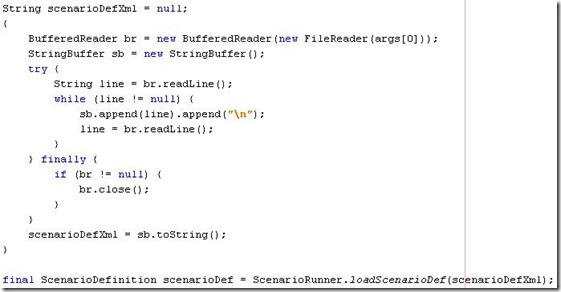
Alright, time for a quick explanation. Basically you will have to create a little program -- which I refer to as "Director" -- in order to use the Bastard API. It is typically very simple. Basically what it does are: (1) Loads the content of the XML file (whose name is passed in as an argument to the program execution). Then you (2) feed that XML string into a method named loadScenarioDef that belongs to the library class named ScenarioRunner. In return you will get an instance of ScenarioDefinition. Further you (3) create an instance of ScenarioRunner and spawn a thread to run it. There's an instance method named run that belongs to ScenarioRunner, into which you will have to pass the scenario definition you created in step 1 and the instance of mediator (see the doc in the previous entry to understand the meaning of it) .

Some screenshots...:

Step (1)

frijoldirector_01

Step (2)

frijoldirector_02

Step (3)

frijoldirector_03

As you see in the screenshot of step 1, you will have to pass the path to the scenario XML file as the argument to the program execution. The project comes with several XML files that you can use to play with. Try duh.xml first (for its nice name). If you’re using Netbeans, use the following screenshot as a reference.

frijoldirector_05

By running FrijolDirector with duh.xml, you should see this in the output console:

frijoldirector_04

Okay. That’s all for today. Feel free to mail me in case you have trouble running / trying / using it. Saludos.